
Protect your business with iMonitor EAM The most complete employee computer activities monitoring software
Block application, block program
IMonitor EAM can block unwanted applications and program as you set
IMonitor EAM Application blocking allows you to see the applications that have been used each day during work hour. If someone downloads a new program that starts affecting the performance of your computer, you'll be able to quickly see the new application in IMonitor EAM. IMonitor EAM also can block applications you don't want to be started or completely restrict certain users from using the PC. You also can set specified application to work as you like.
Now more and more softwares are released for free via internet, and entertainment softwares occupy a high proportion. It is exactly these softwares that should be responsible for the inefficiency during work. They capture employees' attention when they feel boring at work. At this time most employees tend to get some pleasure from them if their manager is absent.
So how to deal with it, that is the problem.
OK, let's see how Employee Activity Monitor can do.
In running status, click task manager, then click running processes. You can see all running applications and program in the selected computer. Picture as followed:
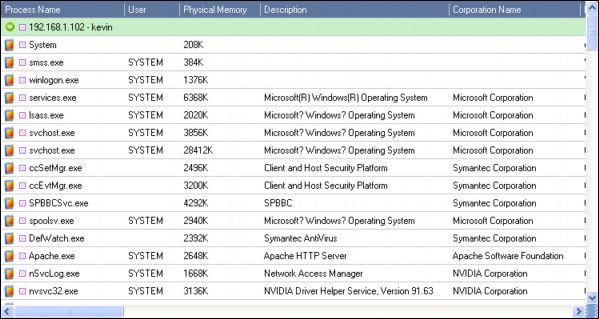
This is only to view the running applications on remote computer. You can also block them as you like.
Follow these steps: Choose any application you want to block, then click application filter, click add selection, then you can write a rule description.
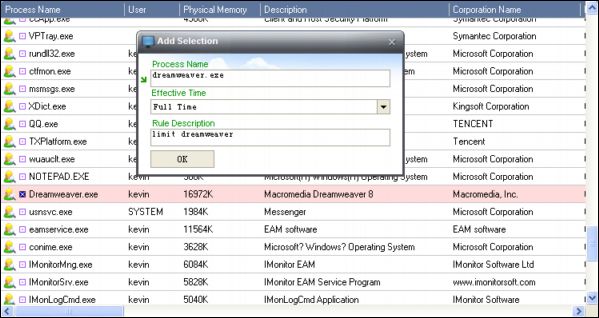
Click ok, the selected process was added.
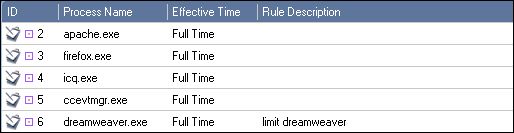
If you want to block firefox, click add rule, fill process name with firefox.exe, then add a description, ok.
In this way, firefox is blocked successfully.
Back




